Custom
The Custom Hub is a highly versatile tool that allows you to tailor your hub to your exact needs. Whether you need to monitor specific data points or create custom charts to track key metrics, the Custom Hub provides the flexibility to do so. All of the data displayed throughout the hub is available in the Custom Hub, enabling you to create personalized charts with any data you need. With this level of customization, you can gain deep insights into your system's performance and identify opportunities for optimization.
Creating your own dashboard
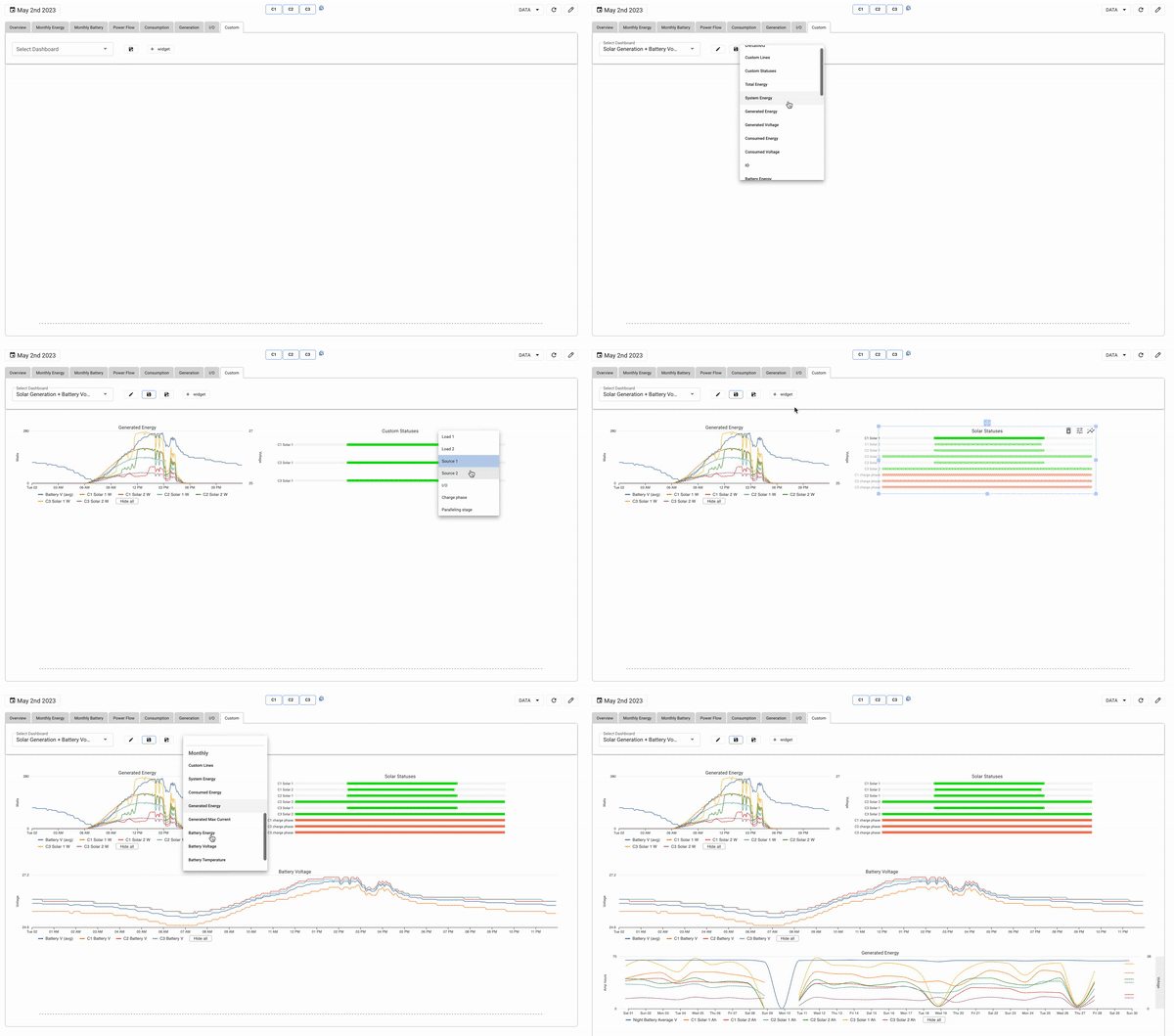
Start your own dashboard by clicking the "save as" button. Name your dashboard, you can change it latter. Widgets are devided into Detailed and Monthly. Detailed are the widgets with 10s or 5min data. It can show data for a 1-7 days, depending on how many controllers are in the system. Monthly shows data for 1-12 months.
Once you are finished creating your dashboard, click save.
Creating your own widget
From the widget menu, you have the option to select default options as well as create your own widget. At the top of the menu there is "Custom Line" and "Custom Status". Custom line will allow you to plot any data point on a line graph and custom status will allow you to show any port status you wish. Select which on you want, place it on the hub and from the menu on the widget you can select which data you want to add or remove.